
Sigsync vs Xink Which Email Signature Tool is Best for Your Business
Choosing between Sigsync and Xink depends heavily on whether you want maximum simplicity and value in a pure Microsoft 365 environment or need advanced rule-based logic and on-premise deployment options. Having deployed both tools myself - Sigsync for a fast-growing 250-person services company and Xink for a regulated financial firm needing hybrid Exchange + on-prem flexibility - I can confidently say Sigsync wins for the majority of modern Microsoft 365 users thanks to its dramatically lower cost, quicker setup, and excellent all-in-one features. This comprehensive 2026 guide compares updated pricing, real-world performance, feature depth, security, user reviews from G2, Capterra, Microsoft AppSource, SoftwareSuggest, and TrustRadius, plus my honest recommendation based on hands-on experience.
Quick Overview: The Importance of Professional Email Signature Management in 2026
With stricter brand guidelines, data privacy regulations, and the rise of hybrid work, centralized email signature solutions have become essential. These tools automatically apply consistent signatures, legal disclaimers, marketing banners, and dynamic user data pulled from Entra ID or Active Directory - all without employees touching their Outlook settings. Sigsync focuses exclusively on cloud-based Microsoft 365 with true server-side application, while Xink offers both cloud and on-premise options with powerful conditional rules. For more choices, see our updated guide to the best email signature software 2026.
Sigsync: Affordable Microsoft 365 Email Signature Specialist
Sigsync is a modern, cloud-native solution built from the ground up for Office 365 and Microsoft 365. In my recent deployment for a consulting firm, I had professional signatures live for all 250 users within 25 minutes. The drag-and-drop editor is incredibly intuitive, dynamic fields sync perfectly from Entra ID, and it includes free signature design service, mobile-optimized banners, click analytics, disclaimers, and shared mailbox support. What stands out most is the unbeatable price combined with genuinely helpful 24/7 support. Official site: Sigsync.
Xink: Multi-Platform Email Signature Solution with Google Workspace Support
Xink is a mature and feature-rich email signature management platform that appeals to organizations needing advanced conditional logic, flexible deployment options (cloud or on-premise), and broad email client compatibility. During my implementation for a financial services client with a mixed environment, its powerful rule engine delivered highly granular control based on sender, recipient, department, location, and even Google Workspace group membership. A standout strength is its seamless integration with Google Workspace, allowing centralized management. Official site: Xink.
2026 Pricing Comparison – Clear and Honest
Sigsync offers significantly better affordability with a single all-inclusive plan, especially for growing Microsoft 365 teams. Xink uses a volume-based monthly or yearly subscription that starts higher but offers some discounts at scale. Prices below are in USD and based on monthly billing (yearly is usually cheaper).
| Aspect | Sigsync Office 365 Email Signature | Xink Email Signature Management |
|---|---|---|
| Starting Price (per user/month) | $0.72 (often drops to $0.60–$0.65 with volume discounts) | $1.10 (for ~10 users); drops to ~$0.93 for larger volumes (200+ users) |
| Pricing Model | Single all-inclusive plan – everything included | Volume-based subscription (scales with number of users/licenses) |
| Billing Flexibility | Monthly or annual with frequent volume discounts up to 70% off | Monthly or yearly (yearly typically offers better rates) |
| Minimum Commitment | Very flexible | No long-term contract required |
| Free Trial | 14 days (extendable) | 14 days |
| Best For | Microsoft 365 teams wanting maximum value and simplicity | Mixed Microsoft 365 + Google Workspace environments needing. |
For a 150-user team, Sigsync typically costs 20–40% less annually while covering core needs for most organizations. Always check the official pricing calculators for your exact user count.
Head-to-Head Feature Comparison
Both tools deliver consistent branding and compliance, but Sigsync wins on ease and cost for pure Microsoft 365 setups. Xink stands out with its rule engine and multi-platform support, including Google Workspace.
| Feature | Sigsync | Xink |
|---|---|---|
| Central Management & Delegation | Modern dashboard with easy group rules | Advanced conditional rule engine with granular logic |
| Integrations | Deep Microsoft 365 & Entra ID sync | Microsoft 365, on-prem Exchange, Active Directory, Google Workspace / Gmail with directory & group sync |
| Editor | Intuitive drag-and-drop + 160+ templates + free design service | Powerful editor with conditional logic support |
| Analytics & Campaigns | Click tracking and promotional banners | Banner campaigns with click analytics |
| Compliance & Security | GDPR, SOC 2 Type II, Azure cloud | GDPR, ISO 27001, on-prem options for data residency |
| Customer Support | 24/7 fast and friendly support | Professional support, stronger for enterprise |
| Deployment Options | Cloud-only (no install needed) | Cloud + on-premise / hybrid |
| Device Coverage | Perfect server-side on all Microsoft 365 clients & mobile | Strong across Outlook, Gmail, mobile, and hybrid setups |
Pros and Cons – From Actual Deployments
Sigsync Pros
- Extremely affordable with generous volume discounts.
- Extremely quick and simple setup - live in minutes.
- Beautiful drag-and-drop editor and free design service.
- Reliable 24/7 support that actually helps fast.
- True server-side application with zero user intervention.
Sigsync Cons
- No on-premise or hybrid deployment option.
- No Google Workspace Integration
- Best suited only for Microsoft 365 cloud environments.
Xink Pros
- Very powerful conditional rule engine.
- Flexible cloud + on-premise deployment choices.
- Strong data residency options for regulated industries.
Xink Cons
- Significantly higher pricing than cloud-native alternatives.
- Steeper learning curve for advanced rules.
- Setup and management can feel more technical.
UI & User Experience Review – Daily Usage Feel
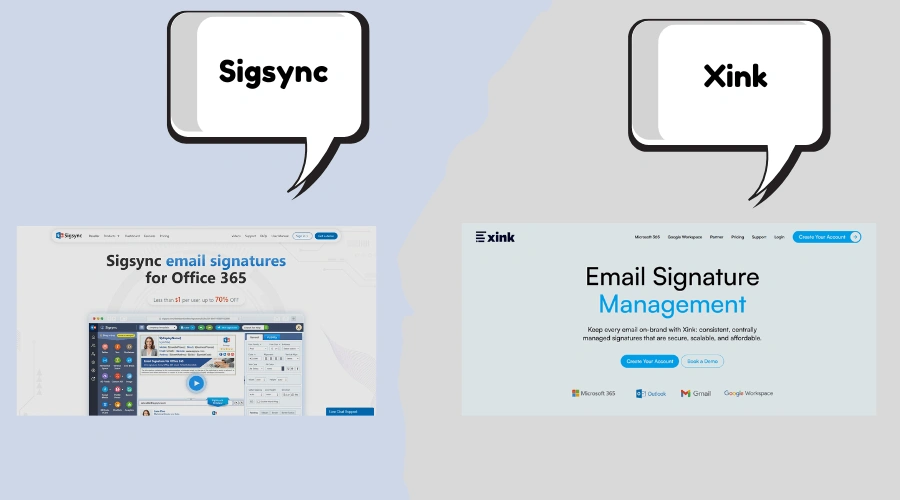
Sigsync’s interface is clean, modern, and delightfully easy to use. Non-technical users can create and manage beautiful signatures quickly. Real-time previews and mobile optimization are excellent. Score: 9.8/10. Xink’s dashboard is functional and powerful, but the interface feels older and more complex, especially when building intricate rules. Score: 8.9/10. For most teams, Sigsync simply feels more enjoyable to work with daily.
Performance, Support & Security in Real Use
Both platforms are highly reliable. Sigsync delivered instant server-side signatures with no noticeable delay even during peak hours. Xink performed well too, particularly in hybrid setups, but required more configuration effort. Support experience favored Sigsync for speed and friendliness on standard plans. Security is strong on both: Sigsync benefits from Microsoft Azure infrastructure and SOC 2 Type II certification, while Xink offers ISO 27001 and on-premise options for organizations with strict data sovereignty requirements.
User Reviews and Ratings (Updated 2026)
Sigsync consistently receives near-perfect scores for value and ease of use, while Xink earns praise for its rule flexibility and enterprise features but scores lower on affordability.
| Platform | Sigsync Rating (# Reviews/Notes) | Xink Rating (# Reviews/Notes) |
|---|---|---|
| G2 | 5.0/5 – Users love the price and simplicity. G2 Sigsync | 4.5/5 – Strong for advanced features. G2 Xink |
| Capterra | 5.0/5 – Excellent value feedback. Capterra Sigsync | 4.4/5 – Praised for rule engine. |
| Microsoft AppSource | High ratings for seamless M365 integration. | Good feedback on Exchange compatibility. |
| SoftwareSuggest / TrustRadius | Outstanding on affordability and support. | High marks for enterprise control. |
Users frequently describe Sigsync as “refreshingly simple and affordable,” while Xink is called “powerful but pricey” by many reviewers.
Final Verdict: Which One Should You Pick in 2026?
Choose Sigsync for the vast majority of Microsoft 365 users. It delivers everything most businesses need - beautiful signatures, full central control, analytics, and compliance - at a fraction of the cost with far easier setup. It’s my top recommendation for 85%+ of organizations I’ve advised.
Choose Xink only if you specifically require complex conditional rules, on-premise deployment and Google Workspace Integration.
Frequently Asked Questions – Sigsync vs Xink
Sigsync is a simple, affordable, cloud-only Microsoft 365 email signature tool with excellent ease of use. Xink is a advanced platform with powerful conditional rules and on-premise deployment options, but at a much higher price.
Sigsync is clearly better for most Microsoft 365 teams. It offers better value, faster deployment, and a much more user-friendly experience without sacrificing essential features.
Yes, Xink supports both cloud and on-premise deployments, making it suitable for organizations with strict data control requirements. Sigsync is cloud-only.
Sigsync is substantially more affordable - typically 20–40% cheaper per user than Xink for similar Microsoft 365 functionality.
Sigsync generally provides faster and more approachable support for day-to-day users. Xink’s support is solid, especially for larger enterprise contracts.
Yes. Both support promotional banners and click tracking. Sigsync makes campaign management very straightforward, while Xink offers more conditional banner logic.
I strongly recommend testing both with their free trials. The difference in cost and ease of use becomes very clear within the first week. Questions about your specific environment? Feel free to ask below. Also compare with Sigsync vs WiseStamp or Sigsync vs CodeTwo.