
Read Trending Articles
CodeTwo vs Exclaimer 2026: Which Email Signature Tool is Best for Your Business?
Confused between CodeTwo and Exclaimer in 2026? Compare pricing, features, ease of use, support, and reviews to find the right for your business
Read Article
Best Email Signature Software 2026: Expert Reviews & Comparisons
Discover the top tools for centralized email signatures in Microsoft 365 - features, pricing, pros/cons, and which one fits your team best in 2026.
Read Article
Sigsync vs CodeTwo 2026: Which Email Signature Tool is Best for Your Business
Detailed comparison of Sigsync vs CodeTwo for Microsoft 365 email signatures. Analyze pricing, features, user interface, and support quality.
Read Article
Office 365 Management Guide 2026: Complete Microsoft 365 Admin Handbook & Best Practices
Master Microsoft 365 administration with this complete guide covering security, compliance, user management, and optimization tips.
Read Article
Email Disclaimer Examples: Complete Guide, Laws & Best Practices
Learn how to create professional email disclaimers with legal insights, real examples, and compliance best practices.
Read Article
How to Encrypt Email in Outlook & Microsoft 365 – Complete Guide
Step-by-step guide to encrypt emails in Outlook and Microsoft 365. Learn methods, tools, and best practices for secure communication.
Read ArticleWhat Is an Email Signature in Office 365?
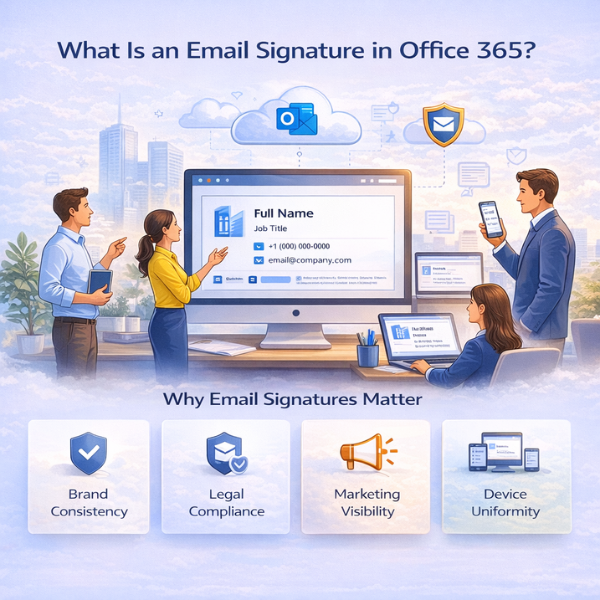
An email signature is the block of information that appears at the end of a message — typically a name, job title, company, and contact details, sometimes with a logo, disclaimer, or banner. In a personal inbox it's a convenience. Inside an Office 365 organization it becomes something bigger: a branding asset, a compliance mechanism, and a communication layer that touches every message leaving your domain.
The challenge is scale. When each person builds and edits their own signature by hand, the results drift almost immediately — mismatched fonts, outdated titles, missing disclaimers, broken logos on mobile. What looks fine on one desktop looks unprofessional on the next. This is why larger organizations move signature management out of individual hands and into a centralized system that applies a single approved standard to everyone.
Why Email Signatures Matter
- Brand consistency: Every message carries the same layout, colors, and details, so your organization looks like one company rather than dozens of individuals.
- Legal compliance: Required disclaimers, confidentiality notices, and regulatory text are appended automatically instead of depending on people to remember them.
- Marketing reach: Routine email becomes a controlled channel for banners or campaign messaging that can be updated centrally without asking staff to change anything.
- Cross-device uniformity: Formatting holds up across desktop, web, and mobile clients — the place where hand-managed signatures most often fall apart.
Complete Guide to Office 365 Email Signature Management
Running signatures for one person is a settings menu. Running them for a whole organization is a different job — and the built-in Outlook options stop being enough surprisingly fast. This guide walks through the real approaches, where each one breaks down, and how teams keep signatures consistent and compliant as they scale.
1. Native Approach vs Third-Party Solutions
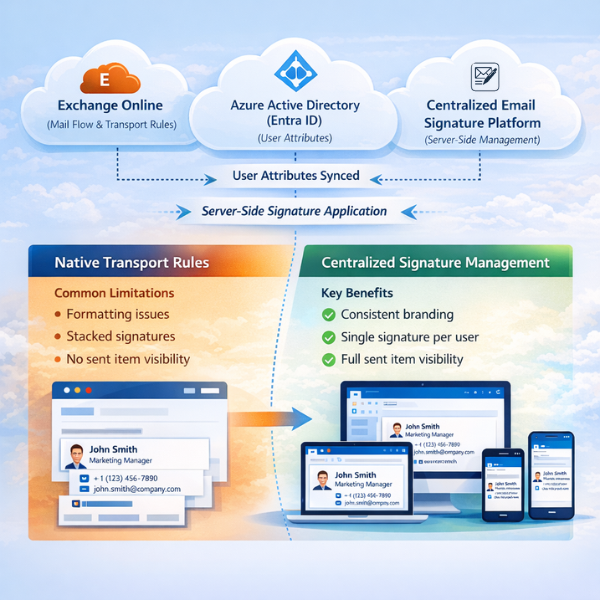
Office 365 can append signatures on its own using Exchange transport rules, and for a plain company-wide disclaimer that's often enough. The limits show up once you want real signatures: transport rules struggle with rich formatting, they tend to stack a second block onto replies rather than replace it, and what they append doesn't show in the sender's Sent Items — so people can't see what actually went out. Third-party tools mostly exist to solve those three problems.
2. Setting Up Company-Wide Rules
One disclaimer for everyone is straightforward. It gets harder when you want each signature personalized — pulling name, title, and phone from directory attributes in Azure AD (now Entra ID). That only works if those fields are actually filled in and kept current, so the real work isn't writing the rule, it's the ongoing governance behind it. A rule that reads an empty "title" field just produces a signature with a blank line where the job title should be.
Centralized Control
Manage thousands of users from one place instead of touching each mailbox — no per-user setup, and no chasing people to update their own signatures.
Core Concepts Covered
- Native vs Third-Party Controls
- Exchange Transport Rules
- Azure AD Attribute Syncing