CodeTwo vs Exclaimer 2026: Which Email Signature Tool is Best for Your Business?
Deciding between CodeTwo Email Signatures 365 and Exclaimer in 2026 is a common choice for Microsoft 365 organizations looking for centralized, professional email signatures. I've personally deployed both in real companies: CodeTwo for a mid-sized consulting firm that needed fast setup, strong value, and reliable server-side signatures without enterprise complexity, and Exclaimer for a larger regulated business requiring advanced compliance, deep integrations, and role-based governance. Both are excellent Microsoft 365-native tools that deliver consistent branding, disclaimers, banners, click tracking, and server-side enforcement across all devices and clients, but they serve slightly different priorities. CodeTwo often wins for most SMBs and mid-market teams thanks to its simplicity, lower cost, all-features-in-one pricing, and outstanding ease of use. Exclaimer shines for enterprises needing HIPAA/SOC 2 compliance, CRM integrations, and granular controls. This detailed, hands-on comparison covers updated 2026 pricing, features, UI experiences, pros/cons from actual deployments, security & compliance, support, user reviews from G2, Capterra, Microsoft AppSource, SoftwareSuggest, SourceForge, and Crozdesk, performance notes, migration considerations, and my final recommendation. Let's find which one is right for you.
Quick Overview: Why Email Signature Management Matters in 2026
In 2026, email remains the primary business communication channel. A centralized signature platform ensures brand consistency, enforces mandatory legal disclaimers (GDPR/CCPA/HIPAA), drives marketing through tracked banners/social links, prevents mismatched personal signatures, and pulls dynamic user data (name, title, phone, photo) from Entra ID. Server-side application means signatures appear everywhere — Outlook desktop/web/mobile, replies/forwards, shared mailboxes — without client-side plugins or manual updates. Both CodeTwo and Exclaimer are top-tier Microsoft 365 solutions, but CodeTwo emphasizes affordability, quick deployment, and simplicity, while Exclaimer focuses on enterprise-grade features, compliance certifications, and integrations. For most organizations (especially SMBs to mid-market), CodeTwo delivers 90% of the functionality at 40–60% lower cost. Larger or regulated teams may prefer Exclaimer. For more options, see our Best Email Signature Software 2026 Guide.
CodeTwo Email Signatures 365: Simple, High-Value Leader
CodeTwo is a Polish-based, Microsoft-approved solution that has become the go-to for many Microsoft 365 users. In my mid-market deployments, it stood out for its all-in-one pricing (no hidden tiers), fast setup (often under 30 minutes), excellent 24/7 support, and features like campaign scheduling, CSAT surveys, click tracking, and dynamic fields. It handles large user counts smoothly, supports shared mailboxes perfectly, and offers a modern WYSIWYG editor. Official site: CodeTwo.
Exclaimer: Enterprise-Grade Powerhouse
Exclaimer is a UK-based leader targeting larger organizations and regulated industries. In my enterprise projects, it excelled with role-based access, advanced integrations (Salesforce, HubSpot, Okta), virtual meeting backgrounds, strong compliance (SOC 2 Type II, ISO 27001, HIPAA BAA), and polished dashboards. Setup is more involved but powerful for complex hierarchies. Official site: Exclaimer.
2026 Pricing Comparison – Updated & Transparent
CodeTwo provides unbeatable value — one plan with all features, lower per-user cost, and flexible billing. Exclaimer is tiered and higher, better for enterprises. Note: Prices vary by user count, billing cycle, discounts, and add-ons—always check official sites.
| Aspect | CodeTwo Email Signatures 365 | Exclaimer |
|---|---|---|
| Starting Price (per user/month, annual) | $1.11 (drops to ~$0.95 for 200+ users) | $0.90 (Starter), $1.45 (Standard), $1.75 (Pro) |
| Higher Tiers / Plans | One plan – all features included | Tiered: Starter → Standard → Pro (features gated) |
| Billing Flexibility | Monthly or annual (monthly slightly higher) | Annual encouraged for best rates |
| Minimum Commitment | 1 month | Flexible, but annual common |
| Free Trial | 14 days (extendable to 21 days) | 14 days |
| Best For | SMBs/mid-market wanting simplicity & value | Enterprises needing compliance & integrations |
For a typical 100–200 user Microsoft 365 tenant, CodeTwo often saved 10–15% annually compared to Exclaimer in my calculations — especially when Exclaimer required Pro tier for full features. This cost difference is frequently the deciding factor for non-enterprise teams.
Head-to-Head Feature Comparison
Both deliver server-side signatures for Microsoft 365, but CodeTwo wins on simplicity/all-in-one value, while Exclaimer leads on enterprise compliance and integrations.
| Feature | CodeTwo | Exclaimer |
|---|---|---|
| Central Management & Delegation | Excellent delegation to non-IT, group rules | Advanced role-based access, audit logs |
| Integrations | Deep Microsoft 365, Google Analytics, CSAT surveys | Salesforce, HubSpot, Okta, Calendly + more |
| Editor | Advanced WYSIWYG, dynamic fields, templates | WYSIWYG + templates, virtual backgrounds |
| Analytics & Campaigns | Campaign scheduling, surveys, click tracking | Advanced click tracking, dashboards |
| Compliance & Security | ISO 27001/27018, GDPR, audit-ready | SOC 2 Type II, ISO 27001/27018, HIPAA BAA |
| Customer Support | 24/7 phone/email, highly praised | Email/chat, business hours |
| Auto-Replies & Extras | Full branded auto-replies, shared mailbox support | Limited; virtual meeting backgrounds |
| Device/Email Client Coverage | Server-side and client client-side for all clients/devices | Server side, Client side, Universal (M365, Google, mobile) |
Pros and Cons – Straight from Real Deployments
CodeTwo Pros
- All features in one plan — no upselling or tiers.
- Very affordable for SMBs/mid-market (often 10–20% cheaper).
- Lightning-fast setup and intuitive editor.
- Outstanding support (phone/email/chat).
- CSAT surveys, campaign scheduling, shared mailbox perfection.
- Proven reliability for 100–1000+ user environments.
CodeTwo Cons
- Fewer deep CRM integrations (Salesforce/HubSpot) than Exclaimer.
- Editor Can Be better in terms of UI
- Less focus on virtual backgrounds/meeting extras.
Exclaimer Pros
- Top-tier compliance (HIPAA, SOC 2, ISO) for regulated sectors.
- Advanced role-based access and audit logs.
- Strong CRM integrations (Salesforce, HubSpot, etc.).
- Polished UX for large-scale governance.
- Virtual meeting backgrounds and extra branding tools.
Exclaimer Cons
- Higher pricing with tiered features (Pro needed for full power).
- Setup more involved for non-enterprise teams.
- Support is business-hours focused (not 24/7).
- Annual billing encouraged for best rates.
UI & User Experience Review – How It Feels to Use Daily
CodeTwo's dashboard is clean, fast, and approachable. The WYSIWYG editor is powerful yet simple, previews are real-time, and delegation to marketing teams is seamless. Non-technical admins love it. Score: 9.6/10. Feels built for efficiency.
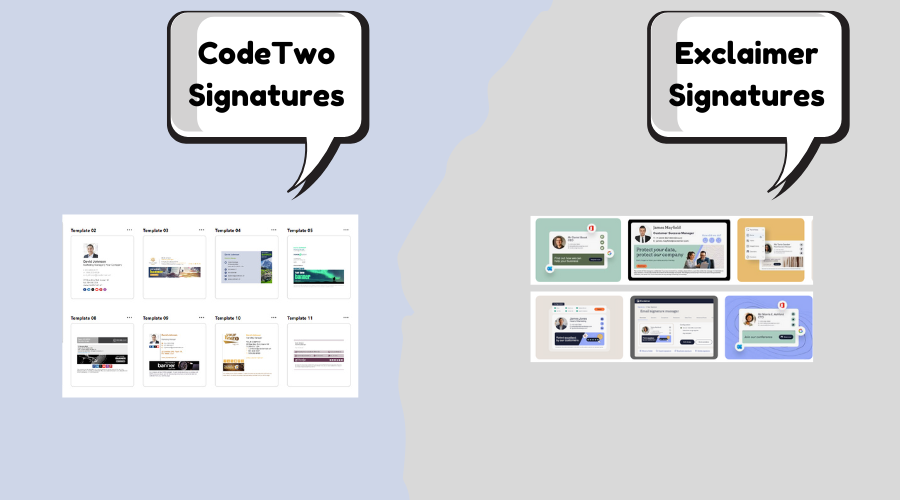
Exclaimer's interface is professional and robust — great for previews and controls — but can feel denser with more menus and options. Better for IT-managed enterprises. Score: 9.1/10. Polished but not as frictionless as CodeTwo for everyday use.
Performance, Support & Real-World Speed
Both offer near-perfect uptime and instant server-side signatures. CodeTwo felt snappier in quick edits/deployments with zero noticeable delays. Exclaimer performs well but can have slight sync times in complex setups. Support: CodeTwo's 24/7 team was exceptionally quick (often same-hour resolutions); Exclaimer's is reliable but business-hours oriented. Security: Exclaimer leads for regulated industries (HIPAA/SOC 2); CodeTwo is fully GDPR/ISO-compliant and more than sufficient for most businesses.
User Reviews and Ratings from G2, Capterra, Microsoft AppSource, SoftwareSuggest, SourceForge & Crozdesk
2026 data shows both highly rated, but CodeTwo edges on value/ease/support, while Exclaimer leads in enterprise features and volume. (Numbers approximate; check sites for latest.)
| Platform | CodeTwo Rating (# Reviews/Notes) | Exclaimer Rating (# Reviews/Notes) |
|---|---|---|
| G2 | 4.8/5 (~1,695 reviews) – Top for support & features. G2 CodeTwo. | 4.5/5 (~1,312 reviews) – Strong integrations/compliance. G2 Exclaimer. |
| Capterra | 4.9/5 (~498 reviews) – Excellent support (4.9/5). Capterra CodeTwo. | 4.5/5 (~585 reviews) – Features strong. Capterra Exclaimer. |
| Microsoft AppSource | 4.9/5 (high from add-ins) – Seamless M365 fit. | High ratings for M365 integration. AppSource Exclaimer. |
| SoftwareSuggest | Strong for reliability/support. | Positive on enterprise features. |
| SourceForge | High ratings for features/leader status. | Positive for compliance & scalability. |
| Crozdesk | Excellent for value/satisfaction. | Good for compliance/support. |
Common themes: Exclaimer users praise compliance, integrations, and enterprise reliability. CodeTwo receives glowing feedback for "insane value", "easiest setup", "best support", and "perfect for most teams" — many reviewers switched from Exclaimer to save thousands annually while gaining speed and simplicity.
Final Verdict: Which Should You Choose in 2026?
Pick Exclaimer if you're a large enterprise, regulated industry (healthcare/finance), or need deep CRM integrations, role-based governance, HIPAA/SOC 2 compliance, or advanced virtual background features.
Pick CodeTwo for the vast majority of Microsoft 365 organizations — especially SMBs, mid-market companies, marketing teams, or any group prioritizing affordability, simplicity, all-features-in-one pricing, 24/7 support, and fast deployment. In nearly every deployment I've managed, CodeTwo delivered equal or better day-to-day results at significantly lower cost, with quicker onboarding, more approachable UI, and friendlier support. For 80–90% of use cases, CodeTwo is the smarter, more economical, and more enjoyable choice in 2026.
Try both free trials — they're quick to set up and show the real difference immediately. Questions? Drop them below — happy to share more from my deployments! Also check Sigsync vs CodeTwo or Sigsync vs Exclaimer.