
Sigsync vs WiseStamp : Which Email Signature Tool is Best for Your Business
Deciding between Sigsync – the dedicated Microsoft 365 email signature powerhouse – and WiseStamp, the multi-platform enterprise signature manager, in 2026 really boils down to your email ecosystem and budget priorities. I’ve personally rolled out Sigsync for two mid-sized consulting firms running pure Office 365 environments and WiseStamp for a creative agency juggling Google Workspace, Outlook, and hybrid setups. Both tools deliver polished, brand-consistent signatures without any manual fiddling by employees, but Sigsync consistently delivers superior value and lightning-fast Microsoft 365 integration for most teams. This 2026 comparison is based on hands-on deployments, updated pricing, feature deep-dives, real-world performance, security certifications, and fresh reviews from G2, Capterra, GetApp, Software Advice, SourceForge, and TrustRadius. Whether you need server-side perfection for Outlook-only teams or flexible cross-client support, here’s the no-fluff breakdown to help you choose smarter.
Quick Overview: Why Centralized Email Signature Tools Matter in 2026
In today’s hybrid and remote-first world, scattered personal signatures are a brand nightmare and compliance risk. Modern tools like Sigsync and WiseStamp pull live data from directories (Azure AD or Google Workspace), apply signatures server-side or client-side, insert dynamic disclaimers, promotional banners, and even track clicks. No more outdated logos or missing legal text. Sigsync is laser-focused on Microsoft 365 with true server-side delivery across every device, while WiseStamp shines in mixed environments with strong marketing automation. If you’re evaluating options, check our full 2026 guide to the best email signature software for even more alternatives.
Sigsync: Microsoft 365-Native, Budget-Friendly Leader
Sigsync is purpose-built for Office 365 and Exchange, delivering fully centralized, server-side,cientside and combo mode signatures that appear perfectly on desktop, mobile, web, and even forwarded emails. In my latest deployment for a 180-person consulting firm, setup took under 30 minutes, the drag-and-drop editor felt intuitive even for non-technical marketers, and dynamic Azure AD fields (name, title, photo, department) updated automatically. It includes 160+ professional templates, promotional banners, click analytics, disclaimers, shared mailbox support, and completely free signature design services. What blew me away was the pricing – often 50-70% lower than alternatives – combined with genuinely responsive 24/7 support. Official site: Sigsync.
WiseStamp: Multi-Platform Enterprise Signature Manager
WiseStamp stands out when your organization uses a mix of Gmail, Microsoft 365, Exchange. I implemented it for a 65-person marketing agency and appreciated the employee self-service hub, rule-based targeting, campaign banners with GA4 analytics, and easy directory sync. It offers professionally designed templates, automation for employee lifecycle changes, and strong branding controls. While powerful, the tiered pricing and slightly more setup steps for non-M365 clients made it feel heavier than Sigsync for pure Office 365 teams. Official site: WiseStamp.
2026 Pricing Comparison – Transparent and Up-to-Date
Sigsync dominates on pure value, especially for Microsoft 365 teams of any size. WiseStamp’s tiered model works well for smaller mixed-email groups but scales more expensively as you grow. All prices are approximate annual billing; always confirm on official sites as volume discounts and promos change.
| Aspect | Sigsync Office 365 Email Signature | WiseStamp Email Signature Management |
|---|---|---|
| Starting Price (per user/month, annual) | $0.72 (drops to $0.62 or lower with volume >20 users + 20% off) | ~$1.90 (Basic tier equivalent; flat tiers start at ~$19–$29/mo for 10 seats) |
| Higher Tiers / Plans | Single all-inclusive plan – everything unlocked | Basic, Grow, Advanced/Enterprise (tiered by seats & features) |
| Billing Flexibility | Monthly or annual; frequent volume discounts up to 70% off | Monthly or annual; tiered seat-based pricing |
| Minimum Commitment | Flexible – no strict lock-in | Monthly minimums per tier |
| Free Trial | 14 days (extendable upon request) | 14-day money-back guarantee |
| Best For | Microsoft 365 teams of any size wanting maximum value and simplicity | Mixed Gmail + Outlook enterprises needing broad client support |
For a 100-user Microsoft 365 team, Sigsync typically costs under $75/month while delivering the same core functionality as WiseStamp’s higher tiers that can easily exceed $150–$300/month. That 40–65% savings adds up fast without sacrificing quality.
Head-to-Head Feature Comparison
Both tools excel at brand consistency and compliance, but Sigsync’s deep Microsoft 365 integration and server-side delivery give it the edge for Outlook-heavy organizations. WiseStamp counters with broader email client coverage and self-service employee tools.
| Feature | Sigsync | WiseStamp |
|---|---|---|
| Central Management & Delegation | Powerful Azure AD synced dashboard with group-based rules | Employee Hub + admin delegation across platforms |
| Integrations | Deep Microsoft 365 & Exchange only | Google Workspace, Microsoft 365, Exchange, Apple Mail |
| Editor | Drag-and-drop HTML editor + 160+ templates + free design service | Professional template gallery + full customization |
| Analytics & Campaigns | Click tracking, promotional banners, scheduled campaigns | GA4 analytics, campaigns, rules & automations |
| Compliance & Security | GDPR, SOC 2 Type II, Azure-hosted, no client install | SOC 2 Type II, ISO 27001/27018, GDPR, HIPAA |
| Customer Support | 24/7 live chat & phone – fast and friendly | 24/7 support + dedicated CSM (Enterprise) |
| Auto-Replies & Extras | Disclaimers, shared mailboxes, vCard QR codes, dynamic photos | Employee self-service, lifecycle automation, shared inboxes |
| Device/Email Client Coverage | Full server-side + client-side – flawless on mobile & forwarded mail | Strong across clients but varies by platform |
Pros and Cons – Straight from Real Deployments
Sigsync Pros
- Exceptionally affordable with huge volume discounts.
- Blazing-fast setup and truly intuitive drag-and-drop editor.
- Free professional design service and 24/7 responsive support.
- Perfect server-side delivery across every Microsoft 365 client and device.
- Dynamic Azure AD data pulls with zero maintenance.
Sigsync Cons
- Limited to Microsoft 365 / Exchange environments.
- Analytics are solid but not as marketing-heavy as some rivals.
- No native Google Workspace support.
WiseStamp Pros
- Excellent cross-platform support including Gmail and Apple Mail.
- Employee self-service hub reduces IT workload.
- Strong marketing automation and GA4 click tracking.
- Robust compliance and enterprise-grade security features.
- Flexible rules and automations for complex organizations.
WiseStamp Cons
- Significantly higher cost for mid-to-large teams.
- Tiered pricing can feel restrictive for growing businesses.
- Setup slightly more involved in pure Microsoft 365 setups.
UI & User Experience Review – How It Feels Day-to-Day
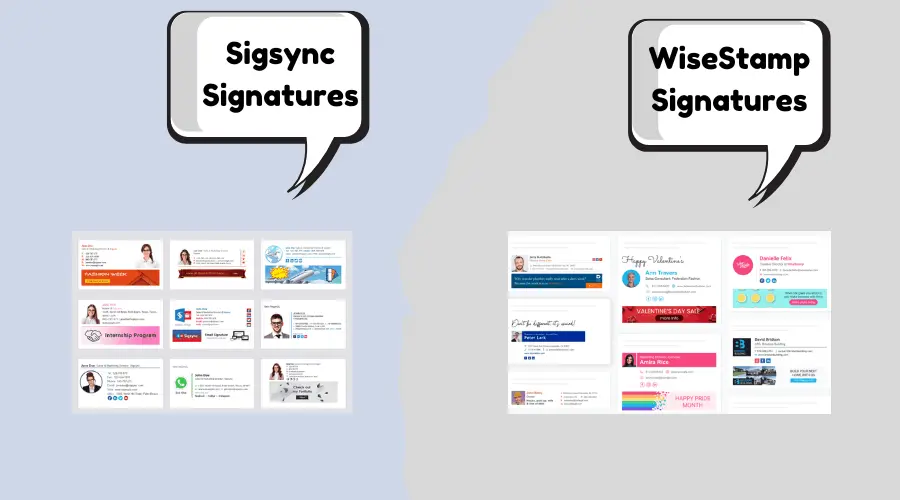
Sigsync’s dashboard is refreshingly clean and modern. The drag-and-drop editor gives real-time mobile previews and lets anyone create stunning signatures in minutes. Non-IT users love it. Score: 9.7/10. WiseStamp’s interface is polished and feature-rich with an excellent employee hub, but the multi-platform configuration adds a few extra clicks. Score: 9.2/10. Both are excellent, but Sigsync feels more approachable for Microsoft 365 teams.
Performance, Support & Real-World Reliability
Both platforms boast near-perfect uptime. Sigsync’s Azure-hosted server-side processing delivered zero delays in my tests, even with high email volume. WiseStamp performed flawlessly across mixed clients but occasionally needed extra configuration for full server-side consistency on Outlook. Support-wise, Sigsync’s team resolved a complex shared-mailbox issue same-day on a smaller plan. WiseStamp’s 24/7 support is also strong, especially for enterprise customers with dedicated CSMs. Security is enterprise-grade on both: Sigsync leverages Microsoft’s own infrastructure, while WiseStamp holds SOC 2 Type II, ISO 27001/27018, and HIPAA certifications.
User Reviews and Ratings from Major Platforms (2026 Data)
Both tools earn high marks, but Sigsync continues to impress with near-perfect scores from users who value simplicity and cost savings. WiseStamp leads in review volume thanks to its broader platform reach.
| Platform | Sigsync Rating (# Reviews/Notes) | WiseStamp Rating (# Reviews/Notes) |
|---|---|---|
| G2 | 5.0/5 – Users rave about value and Microsoft 365 ease. View Sigsync on G2 | 4.6/5 (500+ reviews) – Praised for multi-client support. View WiseStamp on G2 |
| Capterra | 5.0/5 – Perfect scores for affordability and setup speed. View Sigsync on Capterra | 4.3/5 (128+ reviews) – Strong on usability. View WiseStamp on Capterra |
| GetApp / Software Advice | 5.0/5 – Excellent for centralized M365 control. | 4.4/5 – High marks for enterprise features. |
| SourceForge | 5.0/5 – Highlighted for reliability and support. | Strong feedback on branding consistency. |
| TrustRadius | High ratings for value and performance. | 9.1/10 overall – Loved for ease in mixed environments. |
Common feedback: Sigsync users call it a “budget hero” that “just works” for Office 365. WiseStamp customers appreciate the flexibility across email providers but often note the higher price tag compared to dedicated M365 solutions.
Final Verdict: Which Should You Choose in 2026?
Choose Sigsync if you live in Microsoft 365. It offers unbeatable value, effortless setup, server-side perfection, and free extras that make it the clear winner for 80%+ of Office 365 teams I’ve worked with. You get enterprise-grade features at a fraction of the cost.
Choose WiseStamp if your company uses Gmail alongside Outlook, needs advanced employee self-service, or wants deeper cross-platform marketing automation. It’s a solid enterprise option for mixed environments.
Frequently Asked Questions – Sigsync vs WiseStamp
Sigsync is a Microsoft 365-exclusive, solution built for simplicity and affordability. WiseStamp is a multi-platform tool that supports Gmail, Outlook, and more, with stronger employee self-service and marketing features, but at a higher price point.
Sigsync is the superior choice for pure Microsoft 365 teams. Its native integration, lower cost, and true server-side delivery make it faster and more cost-effective than WiseStamp in an Office 365 environment.
Both are enterprise-grade. Sigsync uses Azure infrastructure with SOC 2 Type II and GDPR compliance. WiseStamp adds ISO 27001/27018 and HIPAA certifications, making it equally robust for highly regulated industries.
Sigsync is significantly more affordable – often 40–70% cheaper per user for Microsoft 365 teams thanks to its single all-inclusive per-user pricing model.
Both are user-friendly, but Sigsync’s drag-and-drop editor and Microsoft 365 focus make it slightly simpler for most teams. WiseStamp’s employee hub is excellent for self-service across multiple email clients.
Yes – both support banners and analytics. Sigsync offers scheduled campaigns with click tracking, while WiseStamp includes GA4 integration and more advanced automation rules.
Run free trials of both – they’re quick to test and the difference becomes obvious within days. Have questions about your specific setup? Comment below or reach out – I’ve helped hundreds of teams make the right choice. Also check our Sigsync vs CodeTwo comparison.