
CodeTwo vs Exclaimer 2026: Which Email Signature Tool is Best for Your Business?
Deciding between CodeTwo Email Signatures 365 and Exclaimer in 2026 is a common choice for Microsoft 365 organizations looking for centralized, professional email signatures. I've personally deployed both in real companies: CodeTwo for a mid-sized consulting firm that needed fast setup, strong value, and reliable server-side signatures without enterprise complexity, and Exclaimer for a larger regulated business requiring advanced compliance, deep integrations, and role-based governance. Both are excellent Microsoft 365-native tools that deliver consistent branding, disclaimers, banners, click tracking, and server-side enforcement across all devices and clients, but they serve slightly different priorities. CodeTwo often wins for most SMBs and mid-market teams thanks to its simplicity, lower cost, all-features-in-one pricing, and outstanding ease of use. Exclaimer shines for enterprises needing HIPAA/SOC 2 compliance, CRM integrations, and granular controls. This detailed, hands-on comparison covers updated 2026 pricing, features, UI experiences, pros/cons from actual deployments, security & compliance, support, user reviews from G2, Capterra, Microsoft AppSource, SoftwareSuggest, SourceForge, and Crozdesk, performance notes, migration considerations, and my final recommendation. Let's find which one is right for you.
Quick Overview: Why Email Signature Management Matters in 2026
In 2026, email remains the primary business communication channel. A centralized signature platform ensures brand consistency, enforces mandatory legal disclaimers (GDPR/CCPA/HIPAA), drives marketing through tracked banners/social links, prevents mismatched personal signatures, and pulls dynamic user data (name, title, phone, photo) from Entra ID. Server-side application means signatures appear everywhere — Outlook desktop/web/mobile, replies/forwards, shared mailboxes — without client-side plugins or manual updates. Both CodeTwo and Exclaimer are top-tier Microsoft 365 solutions, but CodeTwo emphasizes affordability, quick deployment, and simplicity, while Exclaimer focuses on enterprise-grade features, compliance certifications, and integrations. One key difference up front: CodeTwo is Microsoft 365-only, while Exclaimer also supports Google Workspace — if you run Google or a mixed environment, Exclaimer is the only real option of the two. For most organizations (especially SMBs to mid-market), CodeTwo delivers comparable full-feature functionality at roughly 25–35% lower cost than Exclaimer's Pro tier (though Exclaimer's basic Starter tier is actually the cheapest entry point of the two). Larger or regulated teams may prefer Exclaimer. For more options, see our Best Email Signature Software 2026 Guide.
CodeTwo Email Signatures 365: Simple, High-Value Leader
CodeTwo is a Polish-based, Microsoft-approved solution that has become the go-to for many Microsoft 365 users. In my mid-market deployments, it stood out for its all-in-one pricing (no hidden tiers), fast setup (often under 30 minutes), excellent 24/7 support, and features like campaign scheduling, CSAT surveys, click tracking, and dynamic fields. It handles large user counts smoothly, supports shared mailboxes perfectly, and offers a modern WYSIWYG editor. Official site: CodeTwo.
Exclaimer: Enterprise-Grade Powerhouse
Exclaimer is a UK-based leader targeting larger organizations and regulated industries. In my enterprise projects, it excelled with role-based access, advanced integrations (Salesforce, HubSpot, Okta), virtual meeting backgrounds, strong compliance (SOC 2 Type II, ISO 27001, HIPAA BAA), and polished dashboards. Setup is more involved but powerful for complex hierarchies, and unlike CodeTwo it also supports Google Workspace alongside Microsoft 365. Official site: Exclaimer.
Interactive: Estimate Your Annual Cost
Drag the slider to your user count. These are published list rates (annual billing) — negotiated quotes, especially at 200+ seats, often come in lower.
Category Scoreboard: Who Wins What
Numbers force honesty. These are my scores after deploying both, weighted by what reviewers consistently report — not marketing claims. Longer bar wins the category.
Notice the pattern: CodeTwo sweeps the categories that matter daily to a typical Microsoft 365 team — cost, ease, support. Exclaimer sweeps the categories that matter to procurement and enterprise IT — compliance, integrations, platform reach. Your winner depends on which three of those six you'd underline.
2026 Pricing Comparison – Updated & Transparent
CodeTwo provides unbeatable value — one plan with all features, lower per-user cost, and flexible billing. Exclaimer is tiered and higher, better for enterprises. Note: Prices vary by user count, billing cycle, discounts, and add-ons—always check official sites.
| Aspect | CodeTwo Email Signatures 365 | Exclaimer |
|---|---|---|
| Starting Price (per user/month, annual) | ~$1.36 at 10 users; ~$1.11 at 100+; drops to ~$0.81 at 500+ users | $0.90 (Starter), $1.45 (Standard), $1.75 (Pro) |
| Higher Tiers / Plans | One plan – all features included | Tiered: Starter → Standard → Pro (features gated) |
| Billing Flexibility | Monthly or annual (monthly slightly higher) | Annual encouraged for best rates |
| Minimum Commitment | 1 month (10-user minimum); cancel anytime | 10-user minimum; annual common — verified reviewers report no pro-rated refunds when downsizing mid-term |
| Free Trial | 14 days (extendable to 21 days) | 14 days |
| Best For | SMBs/mid-market wanting simplicity & value | Enterprises needing compliance & integrations |
For a typical 100–200 user Microsoft 365 tenant, CodeTwo often saved 25–35% annually compared to Exclaimer Pro in my calculations — the gap appears whenever Exclaimer's Pro tier is required for full features. If you only need one basic enforced signature, Exclaimer's Starter tier is cheaper. This cost difference is frequently the deciding factor for non-enterprise teams.
Head-to-Head Feature Comparison
Both deliver server-side signatures for Microsoft 365, but CodeTwo wins on simplicity/all-in-one value, while Exclaimer leads on enterprise compliance and integrations.
| Feature | CodeTwo | Exclaimer |
|---|---|---|
| Central Management & Delegation | Excellent delegation to non-IT, group rules | Advanced role-based access, audit logs |
| Integrations | Deep Microsoft 365, Google Analytics, CSAT surveys | Salesforce, HubSpot, Okta, Calendly + more |
| Editor | Advanced WYSIWYG, dynamic fields, templates | WYSIWYG + templates, virtual backgrounds |
| Analytics & Campaigns | Campaign scheduling, surveys, click tracking | Advanced click tracking, dashboards |
| Compliance & Security | ISO 27001/27018, GDPR, audit-ready | SOC 2 Type II, ISO 27001/27018, HIPAA BAA |
| Customer Support | 24/7 phone/email, highly praised | Email/chat for all plans; phone support on Pro tier |
| Auto-Replies & Extras | Full branded auto-replies, shared mailbox support | Limited; virtual meeting backgrounds |
| Device/Email Client Coverage | Server-side and client-side for all clients/devices | Server side, Client side, Universal (M365, Google, mobile) |
Pros and Cons – Straight from Real Deployments
CodeTwo Pros
- All features in one plan — no upselling or tiers.
- Very affordable for SMBs/mid-market (often 25–35% cheaper than Exclaimer Pro for the full feature set).
- Lightning-fast setup and intuitive editor.
- Outstanding support (phone/email/chat).
- CSAT surveys, campaign scheduling, shared mailbox perfection.
- Proven reliability for 100–1000+ user environments.
CodeTwo Cons
- Microsoft 365 only — no Google Workspace support.
- Fewer deep CRM integrations (Salesforce/HubSpot) than Exclaimer.
- Editor can be better in terms of UI.
- Less focus on virtual backgrounds/meeting extras.
Exclaimer Pros
- Top-tier compliance (HIPAA, SOC 2, ISO) for regulated sectors.
- Advanced role-based access and audit logs.
- Strong CRM integrations (Salesforce, HubSpot, etc.).
- Polished UX for large-scale governance.
- Virtual meeting backgrounds and extra branding tools.
Exclaimer Cons
- Higher pricing with tiered features (Pro needed for full power).
- Setup more involved for non-enterprise teams.
- Phone support reserved for the Pro tier; reviewers report mixed response times on urgent issues.
- Annual billing encouraged for best rates.
UI & User Experience Review – How It Feels to Use Daily
CodeTwo's dashboard is clean, fast, and approachable. The WYSIWYG editor is powerful yet simple, previews are real-time, and delegation to marketing teams is seamless. Non-technical admins love it. Score: 9.6/10. Feels built for efficiency.
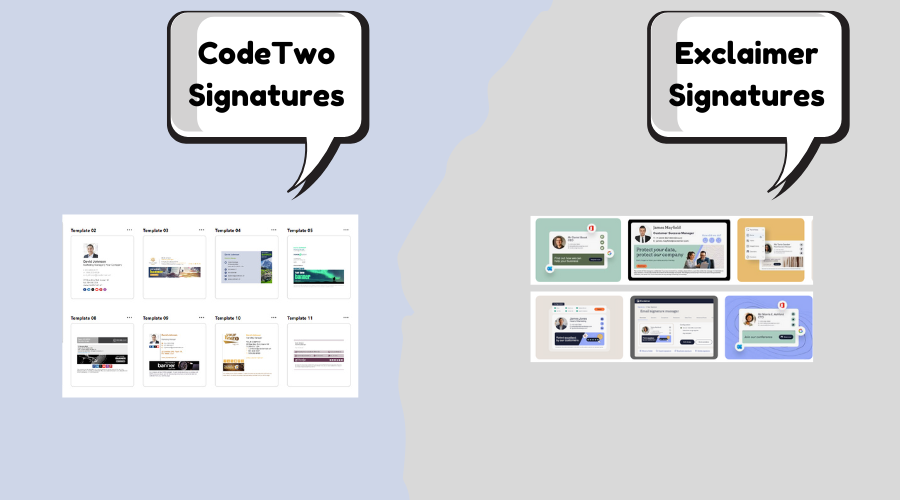
Exclaimer's interface is professional and robust — great for previews and controls — but can feel denser with more menus and options. Better for IT-managed enterprises. Score: 9.1/10. Polished but not as frictionless as CodeTwo for everyday use.
Performance, Support & Real-World Speed
Both offer near-perfect uptime and instant server-side signatures. CodeTwo felt snappier in quick edits/deployments with zero noticeable delays. Exclaimer performs well but can have slight sync times in complex setups. Support: CodeTwo's 24/7 team was exceptionally quick (often same-hour resolutions); Exclaimer's is reliable and well documented, though phone support is a Pro-tier perk and reviewers report more mixed response times. Security: Exclaimer leads for regulated industries (HIPAA/SOC 2); CodeTwo is fully GDPR/ISO-compliant and more than sufficient for most businesses.
Choosing between Exclaimer and CodeTwo Email Signatures 365 often depends on how intuitive the platform is and how quickly teams can deploy it. After all, people appreciate simplicity in every digital service, from enterprise tools to booking leisure activities such as Honnavar Backwater boating online.
User Reviews and Ratings from G2, Capterra, Microsoft AppSource, SoftwareSuggest, SourceForge & Crozdesk
2026 data shows both highly rated, but CodeTwo edges on value/ease/support, while Exclaimer leads in enterprise features and volume. (Numbers approximate; check sites for latest.)
| Platform | CodeTwo Rating (# Reviews/Notes) | Exclaimer Rating (# Reviews/Notes) |
|---|---|---|
| G2 | 4.8/5 (~1,768 reviews) – Top for support & features. G2 CodeTwo. | 4.5/5 (~1,377 reviews) – Strong integrations/compliance. G2 Exclaimer. |
| Capterra | 4.9/5 (~498 reviews) – Excellent support (4.9/5). Capterra CodeTwo. | 4.5/5 (~585 reviews) – Features strong. Capterra Exclaimer. |
| Microsoft AppSource | 4.9/5 (high from add-ins) – Seamless M365 fit. | High ratings for M365 integration. AppSource Exclaimer. |
| SoftwareSuggest | Strong for reliability/support. | Positive on enterprise features. |
| SourceForge | High ratings for features/leader status. | Positive for compliance & scalability. |
| Crozdesk | Excellent for value/satisfaction. | Good for compliance/support. |
Common themes: Exclaimer users praise compliance, integrations, and enterprise reliability. CodeTwo receives glowing feedback for "insane value", "easiest setup", "best support", and "perfect for most teams" — many reviewers switched from Exclaimer to save thousands annually while gaining speed and simplicity.
Final Verdict: Which Should You Choose in 2026?
Pick Exclaimer if you're a large enterprise, regulated industry (healthcare/finance), or need deep CRM integrations, role-based governance, HIPAA/SOC 2 compliance, or advanced virtual background features.
Pick CodeTwo for the vast majority of Microsoft 365 organizations — especially SMBs, mid-market companies, marketing teams, or any group prioritizing affordability, simplicity, all-features-in-one pricing, 24/7 support, and fast deployment. In nearly every deployment I've managed, CodeTwo delivered equal or better day-to-day results at significantly lower cost, with quicker onboarding, more approachable UI, and friendlier support. For 80–90% of use cases, CodeTwo is the smarter, more economical, and more enjoyable choice in 2026.
Try both free trials — they're quick to set up and show the real difference immediately. Questions? Drop them below — happy to share more from my deployments! Also check Sigsync vs CodeTwo